
How to Name Images for SEO in Seconds

Want to know how to name images for SEO?
Naming images for SEO will improve your search engine rankings and website traffic!
This tip makes it so easy – it literally will take just seconds, since you’re already using your best keywords in your headline and URL, right? So copy and paste ’em!
Here’s the step-by-step.
How to Name Images for SEO in Seconds [WordPress Websites]
1. Optimize your URL for your keyword or words (maximum one or two keyword phrases).
My keywords for this post are how to name images and images seo. I edited the URL down to how-to-name-images–seo, removing the extra words.
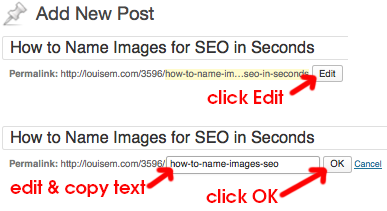
2. Copy your edited URL / keyword phrase, and click OK. Now paste that phrase, including the hyphens, when saving (or renaming) the image you’re using with your blog post.
If using more than one image, you can save them with -1, -2, etc. added at the end, or with a word that’s relevant to the particular image.

3. Next, copy the keyword phrase from your blog post title. Upload your image and paste the keyword phrase as the Alt Text of the image. I add it as the Image Title too. You can add other words after your keyword phrase as appropriate, such as Step 1, Step 2…
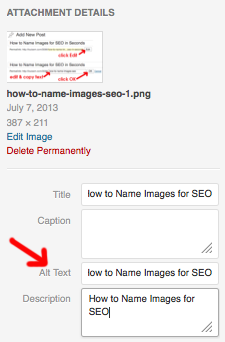
Note: Adding text to the Description field is unnecessary.
That’s it! Now you have a keyword-rich image name and alternate text, which you just copied and pasted in seconds.
Bonus Points for Google AND Pinterest SEO [2016]
But wait! You have a bit more time?
You’ve created a keyword optimized post description, and made the Google gods smile upon you 😉
Now copy that meta description and paste it as the Alt Text of your image! It will be picked up as the Pin description when someone saves that image to Pinterest.
This is way better for Pinterest than just using the post headline, which is already pulled into your Pin if you’ve got Article Rich Pins.
Now the Pinterest Princess can smile on you as well  And guide Pinterest searchers to your creation. And ultimately, to your blog post!
 Name images for Pinterest Search by copying your post’s meta description and adding it as the image Alt Text.
Optimizing Images for SEO, from the King of SEO
Want more? Here are the best tips on optimizing images for SEO from Yoast:
Take these things in mind when adding an image to an article:
- Use a relevant image that matches your text
- Pick the right file name for your image
- Make sure image dimension matches the image size as displayed
- Reduce file size for faster loading
- Add a caption for easier scanning of the page
- Use an image alt text, title text is optional
- Add OpenGraph and Twitter Card tags for the image
- Don’t break the left reading line using an image
- Use images in your XML sitemaps
And here’s where you can find more easy SEO basics to improve your web traffic.
This post on naming images for SEO was originally published July 8, 2013 and updated August 31, 2016.
Know others who could use this easy tutorial on how to name images for SEO? Please share!

{loadposition user99}


Leave a comment